
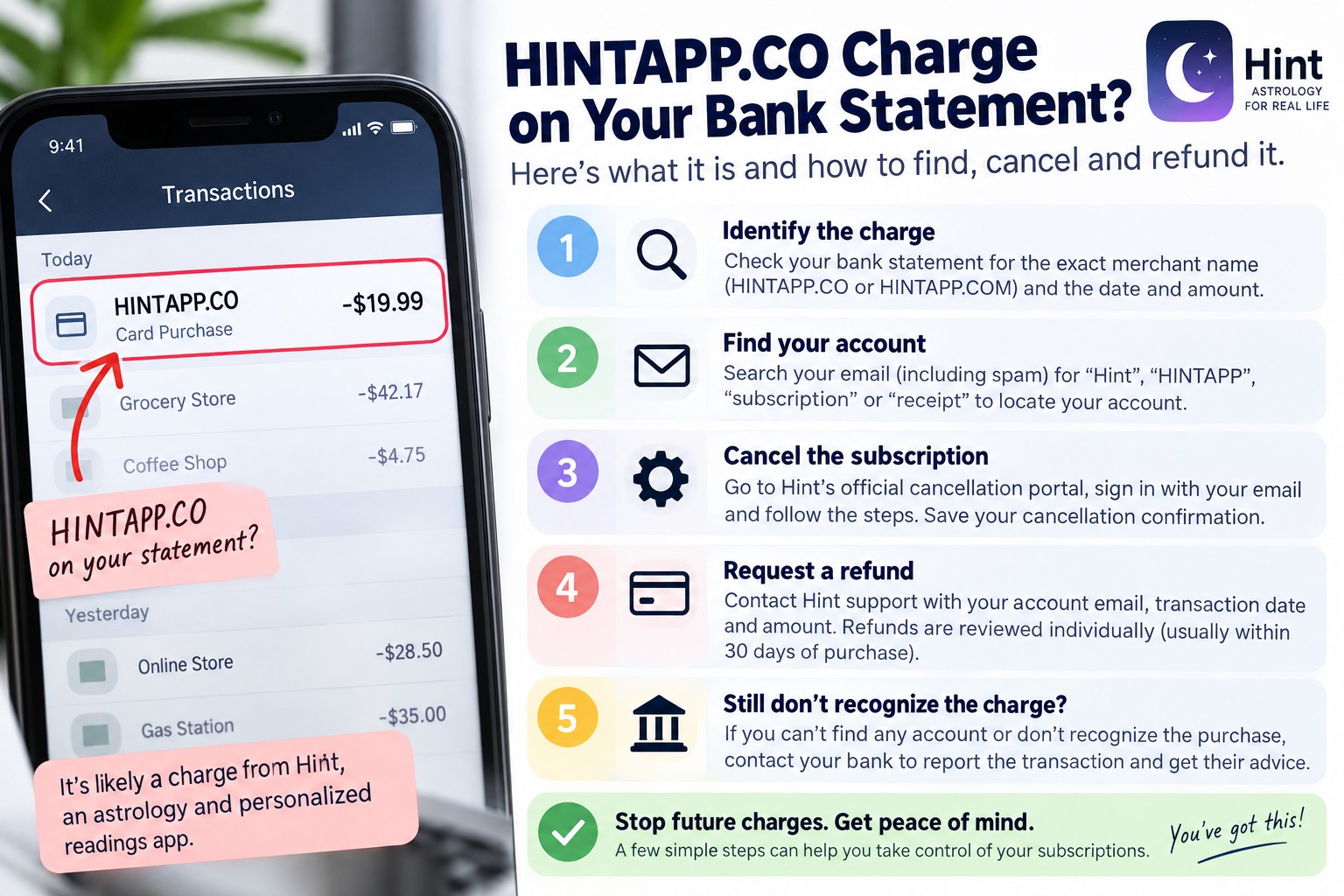
You open your banking app.
There is a charge you do not immediately recognize.
HINTAPP.CO.
Maybe it says HINTAPP.COM.
Maybe the wording is shortened by your bank.
And the first thought is usually the same:
What is this, and why is it taking money from my card?
Do not panic, but do not ignore it either.
If you are looking at a Hint-related charge right now, I would handle it in a very specific order.
First, identify exactly where the payment came from.
Second, find the account connected to it.
Third, stop any future renewal.
Fourth, deal with the charge that has already happened.
And if none of the normal checks explain the transaction, contact your card provider and treat it as an unrecognized payment.
That order matters.
A lot of people make the mistake of jumping straight to a bank dispute before checking whether an old trial, another email address, a family member, Apple, Google Play, or a direct website subscription explains the payment.
Other people make the opposite mistake.
They spend days trying to remember the purchase while another renewal is getting closer.
This guide is designed to avoid both problems.
The Fast Answer: What Is HINTAPP.CO?
Hint is a paid subscription service that offers astrology-related services, personalized readings, horoscopes and other features.
Hint America Inc. operates the service.
Hint's current public offer includes a paid trial followed by recurring subscription billing if the subscription is not cancelled.
However, do not focus only on one advertised price.
Hint's current terms say that subscription offers can differ in price, billing frequency, promotion and region. Your actual subscription terms are the terms shown when the account was created.
The important part is this:
Hint is a recurring subscription service.
If you started a trial or selected a paid offer and did not cancel it before the applicable renewal, another charge can follow.
So if HINTAPP.CO appears on your card, your first job is not to guess whether it is fraud.
Your first job is to trace it.
Before You Cancel Anything, Save These Five Things
This takes a minute and can save you a huge headache later.
Before changing the account, cancelling anything or contacting support, save a screenshot of the transaction.
Make sure you can see:
- The exact merchant description.
- The charge amount.
- The transaction date.
- Whether the payment is pending or completed.
- The last four digits of the card that was charged, if your banking app displays them safely.
Do not send your full card number to anyone.
Do not post a bank screenshot publicly without hiding personal information.
The reason I recommend taking the screenshot first is simple.
Once you start contacting companies, you need to be able to say exactly what you are investigating.
HINTAPP.CO and a random astrology app are not enough information.
The date, amount and exact description help you separate a real subscription from a completely unrelated transaction.
Step One: Read the Bank Charge Exactly as It Appears
Do not work from memory.
Open the transaction and copy the merchant description exactly.
Look for words such as:
HINT
HINTAPP
HINTAPP.CO
HINTAPP.COM
Also look for any city, country, reference number or additional merchant wording your bank provides.
Banks sometimes shorten merchant names.
That means the text on your statement does not always look identical to the name of the service you remember using.
Also check whether there was an earlier smaller Hint-related charge.
This is an important clue.
Hint currently offers paid trials, and its terms also say promotional offers and trial structures can vary.
If you see a smaller earlier Hint payment followed later by a larger recurring transaction, check whether the earlier payment was connected with an account registration or trial.
Do not assume that is what happened.
Verify it.
Step Two: Search Your Email Before Searching Your Memory
People forget subscriptions.
Email usually remembers them.
Open every email account you actually use and search for:
Hint
Hint app
HINTAPP
subscription
trial
astrology
receipt
payment
welcome
cancel
refund
Do not search only your main inbox.
Check spam.
Check promotions.
Check deleted mail if your provider still keeps it.
Most importantly, check old email addresses.
People often create an account using an address they rarely use and then months later search the wrong inbox.
Hint states that customers receive a welcome email containing subscription information.
Finding that email can solve several problems immediately.
It can tell you which address created the account.
It can help confirm whether you signed up.
And it can give you a timeline for the subscription.
A useful hint
Search around the date of the first Hint-related payment, not only the latest payment.
If today's transaction is a renewal, the email you need may be weeks or months older.
Step Three: Ask Yourself One Very Specific Question
Do I remember taking an astrology quiz, requesting a reading, creating a birth chart, getting a soulmate-related result, using a palm-reading feature, or entering payment details on an astrology website?
This question works better than asking:
Do I remember subscribing to Hint?
You may not remember the company name.
You may remember the activity.
Someone can remember paying for a reading without remembering that the website was called Hint.
That does not prove the charge is valid.
It simply gives you another path for identifying it.
If absolutely nothing sounds familiar, continue through the checks below.
Step Four: Find Out Who Actually Controls the Subscription
This is one of the most important parts of the entire process.
Do not assume that because Hint has a mobile app, Apple or Google must control your subscription.
A subscription can be purchased directly from a company's website.
That means you can open your iPhone subscription page, see nothing, and still have an active subscription elsewhere.
The reverse is also true.
You need to identify the billing route.
Check these three places.
Check Hint directly
Hint provides its own cancellation system for subscriptions purchased through its website.
If your charge appears to have been processed directly by Hint, start with Hint's official Help Center and Cancellation Portal.
The current cancellation process asks you to identify the account using your email address and a confirmation code.
If Hint recognizes your email and shows an active subscription, you have found an important part of the answer.
Do not stop there.
Check the renewal status and save proof after cancellation.
Check Apple
If you use an iPhone or iPad, check your Apple subscriptions and Apple purchase history.
Do not check only the list of active subscriptions.
Purchase history can help you see previous transactions as well.
If Apple shows the Hint purchase, manage the subscription through Apple.
If Apple shows absolutely no matching transaction, do not keep cancelling random Apple subscriptions.
Move to the next check.
Check Google Play
If you use Android or have used Android in the past, sign into Google Play and check subscriptions.
Use every Google account you realistically could have used.
This is another common problem.
Someone checks one Google account, sees nothing and assumes there is no subscription.
The purchase may be attached to another Google account.
Google specifically warns that uninstalling an app does not cancel its subscription.
So if you deleted Hint months ago, do not treat deletion as proof that billing stopped.
Step Five: If You Find the Hint Subscription, Cancel It First
If your goal is to stop more charges, handle the renewal before arguing about the old charge.
For a subscription purchased directly through Hint, the company currently directs customers to its Cancellation Portal.
The basic process is:
Go to the official Hint cancellation option.
Enter the email connected to the subscription.
Use the confirmation code.
Complete the cancellation process.
Then save the confirmation.
Do not close the browser and assume it worked.
Look for an explicit cancellation confirmation.
Take a screenshot.
Keep the confirmation email.
Write down the cancellation date.
If the page displays when access ends, save that too.
Hint states that after cancellation, access generally continues through the current paid period and the subscription should not renew for another billing cycle.
Important: Cancelling Is Not the Same as Getting a Refund
This causes a lot of confusion.
Cancelling answers this question:
How do I stop the next renewal?
A refund request answers a different question:
Can I get back money that was already charged?
You can successfully cancel a subscription and still not automatically receive your previous payment back.
That does not mean the cancellation failed.
They are separate processes.
So if you want both outcomes, deal with both.
Cancel the subscription.
Then submit the refund request.
Step Six: Request the Refund Properly
Hint's current refund policy says purchases are generally non-refundable, but the company can consider requests individually.
A refund is not guaranteed.
Hint currently says refund requests must be submitted within thirty days of the purchase.
So do not leave this sitting in your banking app for weeks while deciding what to do.
When you contact Hint, make the request easy to investigate.
Include:
Your Hint account email.
The transaction date.
The exact amount charged.
The merchant wording shown on your statement.
A short explanation of what happened.
Your cancellation confirmation if you already cancelled.
Any relevant supporting screenshot with sensitive information hidden.
Keep the message factual.
Do not write a ten-paragraph angry story before giving the company the details it needs to find the transaction.
Something clear is stronger:
I am requesting a review and refund of the Hint charge dated [date]. The amount was [amount]. My account email is [email]. I cancelled the subscription on [date]. I have attached the relevant transaction and cancellation information.
If you do not recognize the subscription at all, say that directly.
Do not claim you cancelled before the charge unless you actually did.
What Happens After Hint Approves a Refund?
Hint says approved refunds are returned to the original payment method.
The company's Help Center says that after a refund has been processed, it can take up to ten business days to appear, depending on the bank.
That distinction matters.
There is a difference between:
Hint approving or processing the refund.
And your bank actually displaying the money.
If Hint confirms that the refund was processed and you still do not see it immediately, save the confirmation and monitor the original payment method.
If the stated time passes, contact the bank with the refund information.
What If the Card Has Expired or Was Replaced?
Do not assume the refund is lost.
Hint's current refund policy says refunds go to the original payment method.
Its terms state that if the original card has expired or been cancelled, the financial institution handles how the credit reaches your account.
If that happens, contact the bank that issued the original card.
Do not ask Hint to send the refund to an unrelated new card unless its support specifically instructs you otherwise.
Step Seven: What If Hint Says Your Email Does Not Exist?
This is a very common dead end with subscription investigations.
You enter your email.
The site does not recognize it.
Do not immediately conclude that the transaction is fraudulent.
Hint's Help Center specifically says an email can fail to be recognized because there was a typo when the subscription was created or because a different email address was used.
So work through your email addresses systematically.
Check:
Your primary email.
Your older email.
Your Apple-associated email.
Your Google account email.
A secondary email used for shopping.
An email you use for apps.
Then search each inbox for Hint.
Another useful hint
Think about automatic email filling.
If your browser or phone automatically filled a form when you registered, the email used may not be the one you normally type manually.
Check saved account information on your device if appropriate.
Do not create a brand-new paid Hint account just to try to contact support.
That can create another subscription and make the situation worse.
Step Eight: What If You Cancelled and Hint Charged You Again?
Now your evidence becomes extremely important.
Hint has a specific help process for people who believe they were charged after cancellation.
Gather:
The original cancellation confirmation.
The cancellation date.
The later transaction date.
The later transaction amount.
The exact merchant description.
Then contact Hint support and explain the timeline clearly.
Do not write only:
You charged me again.
Write the sequence.
For example:
Subscription cancelled on [date].
Cancellation confirmation received on [date].
New charge appeared on [date].
Amount: [amount].
That gives support something concrete to investigate.
Also check whether the later transaction was already pending before you cancelled.
Your bank can tell you whether a transaction is pending or fully posted.
Step Nine: What If You Signed Up and Were Charged Immediately?
Not every Hint offer includes the same trial structure.
This is why I do not recommend relying on one advertisement or one person's price.
Hint's current Help Center says some discounted offers or packages skip the normal trial and provide immediate access at the selected discounted price.
Its current terms also state that trial length, price, plan and billing interval can vary by offer and region.
So if you were charged immediately, go back to the purchase confirmation and account details.
Look for the exact offer you accepted.
That is more reliable than comparing your payment with someone else's subscription.
Step Ten: What If You Cannot Connect the Charge to Any Account?
This is where the situation changes.
You have checked your email accounts.
You have checked Hint.
You have checked Apple.
You have checked Google Play.
You have asked any other authorized cardholder.
You cannot find a registration, receipt, trial, subscription or purchase.
Now contact your card issuer.
Tell the bank that you do not recognize the transaction.
Give them the exact merchant wording and date.
Explain that you already checked the obvious subscription routes.
The bank can tell you whether to dispute the transaction, replace the card, lock it or take another security step.
Do not use CancelWise, Hint, or any online article as a substitute for your bank's fraud procedure.
Your card issuer controls the card.
If you believe the card itself has been compromised, deal with the bank promptly.
Hint's own Help Center also tells customers with a stolen card or compromised account to work with their card provider on protecting the payment details.
Should You Lock or Replace Your Card?
If you have confirmed that the charge belongs to your own forgotten subscription, you do not automatically need to replace your card simply because you disliked the renewal.
Cancel the subscription correctly and address the refund.
If you genuinely cannot identify the payment, contact the card provider.
Let the bank guide the security response.
A card replacement is more serious than cancelling a subscription because it can affect legitimate recurring payments attached to the same card.
Do not cancel a card blindly if the bank can first tell you what happened.
But do not leave an unrecognized transaction unattended either.
Proof Checklist Before You Consider the Problem Finished
I would not consider this resolved just because a cancellation screen appeared.
Keep a small evidence folder until everything is finished.
Save:
The original charge screenshot.
The Hint account email.
The subscription or trial confirmation.
The cancellation confirmation.
The date you cancelled.
The refund request.
The support ticket or email.
The refund approval if one is issued.
The final bank credit.
This sounds excessive until you need to prove what happened three weeks later.
Then it becomes extremely useful.
Common Mistake: Deleting the App
Deleting the app is not the same as cancelling the billing agreement.
Google explicitly states this for Google Play subscriptions.
And for direct Hint subscriptions, the company provides a separate cancellation process.
If your only action was removing the app from your phone, check the actual subscription status.
Common Mistake: Checking Only Apple
An iPhone user can still buy something directly from a website.
If Hint does not appear under Apple subscriptions, that tells you only that you did not find an Apple-managed subscription in that account.
It does not prove that no subscription exists.
Check the direct Hint account and your email receipts.
Common Mistake: Cancelling but Forgetting the Refund Request
Cancellation protects the future.
It does not automatically reverse the past.
If you believe you are entitled to a refund or want Hint to consider your case, submit the request separately.
And remember the current thirty-day refund-request window stated in Hint's policy.
Common Mistake: Disputing Before Looking for the Account
There are genuine unauthorized-card cases.
There are also forgotten trials.
A five-minute account search can tell you which direction you need to take.
If you find your own account, cancel it.
If you cannot find any connection after a proper investigation, contact the bank.
Common Mistake: Creating Another Account
Do not sign up again just because you cannot access the original account.
You could end up with two subscriptions instead of solving the first one.
Use the official support process to identify the original account.
Common Mistake: Sending Too Much Sensitive Information
Support may need transaction details.
That does not mean you should email your full card number.
Use the information necessary to identify the transaction and follow the company's secure instructions.
If someone asks you for passwords, authentication codes or information that does not make sense for the request, stop and verify that you are dealing with the official company.
HINTAPP.CO FAQ
Is HINTAPP.CO connected to Hint?
Hint is a subscription-based astrology and reading service operated by Hint America Inc.
If your statement contains Hint-related merchant wording, investigate whether it matches a Hint account or subscription before assuming the charge is fraudulent.
Use the full transaction description, date, amount, receipts and account history to confirm it.
What does Hint sell?
Hint offers paid personalized readings and astrology-related subscription features.
Its current service includes personalized guidance and a range of astrology-related content and reports.
Does Hint renew automatically?
Yes.
Hint's official Help Center says subscriptions renew automatically at the applicable billing cycle unless cancelled.
That is why simply stopping use of the service does not stop billing.
How much does Hint cost?
There is no single price I would use to identify every Hint transaction.
Hint's current public pages advertise a paid seven-day trial followed by a recurring monthly subscription for its standard offer.
However, Hint's current terms also state that plans can vary by region, promotion, price and billing frequency.
Use the price displayed in your own purchase confirmation and account.
Why do I remember a small payment but now see a bigger one?
A trial or introductory offer can be followed by the normal recurring subscription charge.
Check the email and account created around the date of the smaller payment.
Do not assume the larger charge is unrelated until you compare the dates.
Why was I charged without getting the advertised trial?
Hint says some discounted offers or packages skip the trial and begin with immediate paid access.
Check the exact offer you selected at signup.
I deleted Hint. Why was I still charged?
Deleting an app does not necessarily cancel the subscription.
You need to cancel through the billing system that controls the subscription.
That can be Hint directly or an app-store billing system depending on how you purchased it.
I cannot find Hint in my Apple subscriptions. What now?
Check your Apple purchase history as well.
Then check Hint directly and search your emails.
A direct website subscription does not have to appear as an Apple-managed subscription.
I cannot find Hint in Google Play. What now?
Check whether you are using the correct Google account.
If nothing appears, investigate whether the subscription was purchased directly from Hint instead.
How do I cancel Hint?
For website subscriptions, Hint currently directs customers to its official Cancellation Portal.
Use the email connected with the account, complete the verification process and follow the cancellation steps.
Save the confirmation.
Will Hint refund me automatically after I cancel?
No.
Cancellation and refunds are separate.
Hint's current refund policy says refund requests are reviewed individually and are not guaranteed.
How long do I have to ask Hint for a refund?
Hint's current refund policy states that requests must be made within thirty days of purchase.
Submit the request promptly.
What information should I send with my refund request?
Hint currently asks customers to provide the account email, transaction information, reason for the refund request and supporting documentation.
Give enough information to identify the transaction without exposing unnecessary sensitive card information.
How long does a Hint refund take?
Hint's Help Center says that once a refund has been processed, it can take up to ten business days to appear depending on the bank.
Can Hint refund a different card?
Its current policy says approved refunds go back to the original payment method.
If the original card has expired or been replaced, contact the issuing bank about how it handles the incoming credit.
Why does Hint not recognize my email?
Hint says this can happen when a different email address was used or when the original email contained a typo.
Check your other accounts and search your inboxes for old Hint messages.
Can I delete the account instead of cancelling?
Do not confuse account deletion with cancellation.
Hint's current terms treat them as separate processes.
The terms state that an active subscription must be cancelled before account deletion.
Deal with the billing first.
I cancelled before the charge. What should I do?
Save your cancellation confirmation and contact Hint with the cancellation date and later charge details.
The company has a support process specifically for customers who believe they were charged after cancelling.
Is every HINTAPP.CO charge fraudulent?
No.
An unfamiliar merchant description by itself does not prove fraud.
Investigate the subscription first.
If you cannot connect the transaction to yourself or another authorized user after checking Hint, your email, Apple and Google Play, contact your card issuer about the unrecognized transaction.
Should I dispute the Hint charge with my bank?
If you genuinely did not authorize the transaction and cannot identify it after checking the normal billing routes, contact your bank and follow its dispute or fraud process.
If the transaction belongs to your own subscription and your issue is cancellation or a refund, contact Hint and the relevant billing provider first unless your bank instructs otherwise.
Will changing my card automatically cancel Hint?
Do not use card replacement as your subscription-cancellation method.
Cancel the subscription properly.
Changing cards can create complications with legitimate recurring payments and does not replace the need to terminate the billing agreement.
What if someone else in my family used my card?
Ask other authorized card users before filing a fraud claim.
If another person subscribed without your approval, contact the merchant and card issuer and explain exactly what happened.
Do not describe a transaction as completely unknown if you already know who made it.
What if I see more than one Hint charge?
Compare the dates and amounts first.
Hint's current terms say subscriptions and certain add-on services can create separate charges, and trial processing can also vary.
Check the account purchase history and ask Hint support to identify each transaction individually.
Do not assume every charge has the same explanation.
My Recommended Order of Action
If HINTAPP.CO is sitting on your statement right now, this is the order I recommend:
First, screenshot the transaction.
Second, search every relevant email account for Hint.
Third, check Hint's own account and cancellation system.
Fourth, check Apple purchase history and subscriptions if you use Apple.
Fifth, check Google Play subscriptions under every relevant Google account.
Sixth, if you find an active subscription, cancel it and save proof.
Seventh, submit a refund request if appropriate and do it within the applicable deadline.
Eighth, monitor the card for the refund or any additional charge.
Ninth, if you cannot connect the transaction to any authorized purchase, contact the card issuer and report the unrecognized transaction.
That process gives you something better than guessing.
It gives you a trail.
Final Word
An unfamiliar charge feels much worse when all you have is a strange merchant name and no idea where it came from.
The solution is to separate the problem into two questions.
Where did this payment come from?
And what do I need to do next?
If HINTAPP.CO is connected to a subscription you created, find the account, cancel the renewal, save the confirmation and request a refund if appropriate.
If you cancelled earlier and another charge appeared, document the timeline and contact Hint.
If Hint cannot find your email, check every realistic email account and look for the original welcome message or receipt.
And if you complete those checks and still cannot connect the payment to yourself or another authorized user, stop treating it as a forgotten subscription and contact your card issuer about an unrecognized transaction.
Do not ignore it.
Do not create another subscription trying to fix it.
Do not send strangers your card information.
And do not delete an app and assume the billing disappeared with it.
Trace the payment.
Stop the renewal.
Keep the proof.
Then make sure the issue is actually finished.
Comments (0)
No published comments yet. Start a useful, respectful discussion.