
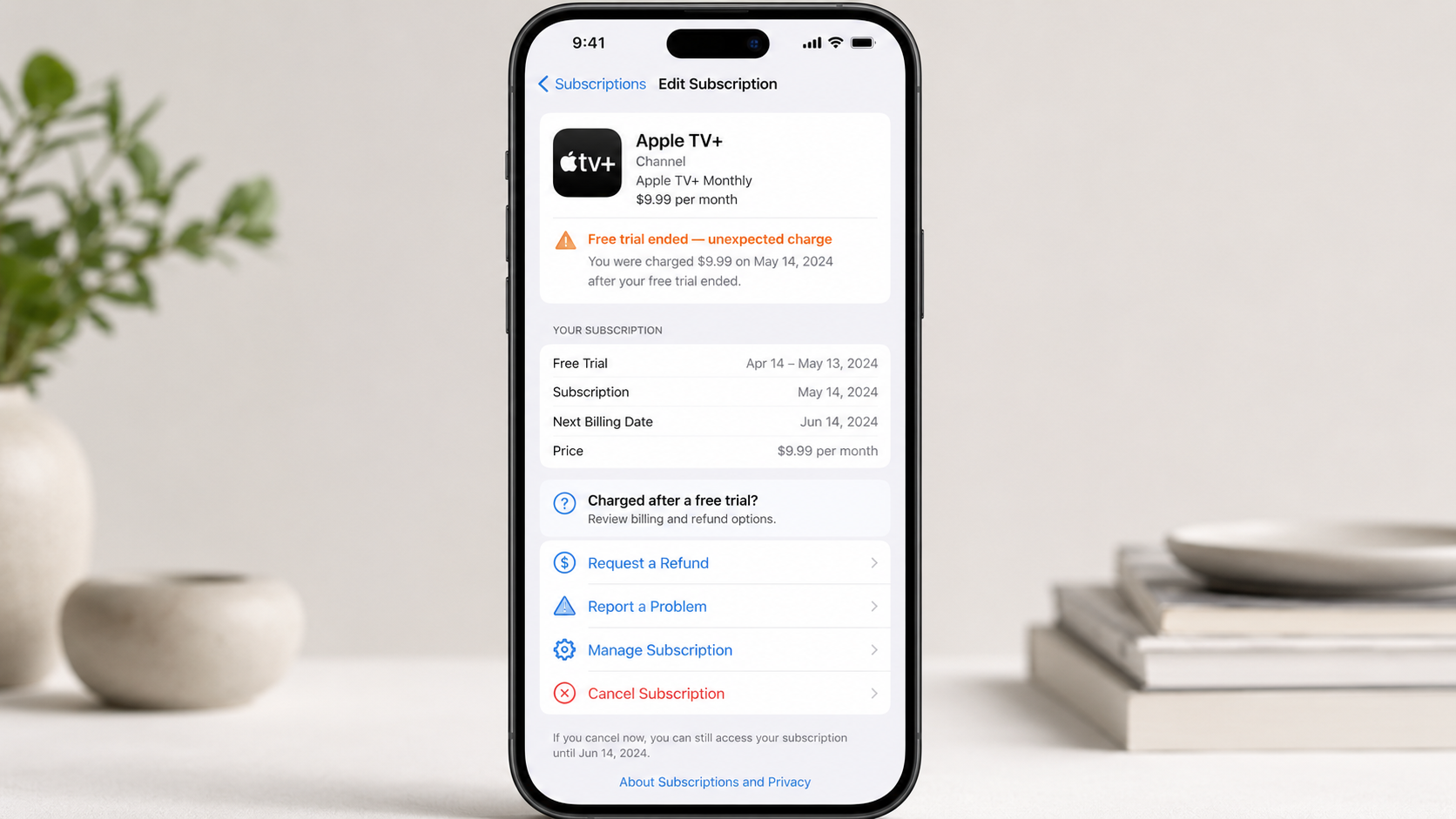
You saw the word free. You accepted the offer. Then, before you had even decided whether the app was worth keeping, a charge appeared on your card.
That is an awful feeling.
Your first thought may be that the trial was misleading or that Apple ignored the promised free period. Before cancelling your card or opening a dispute, take a few minutes to identify exactly what Apple recorded.
An immediate charge does not always have the same explanation. It could be a pending transaction, a different Apple purchase, an offer you were not eligible to use, or a paid subscription that started without the free trial being applied.
The important thing is to work through the possibilities in the correct order.
The fast answer
According to Apple, a genuine free-trial introductory offer gives access immediately, but billing does not begin until the free period ends.
If you were charged immediately, check these four things first:
- Is the transaction pending or completed?
- Does the charge appear in your Apple purchase history?
- Have you previously used a trial from the same subscription group?
- Does the subscription screen show a free-trial end date or an active paid plan?
Do not rely only on the name shown by your bank. Apple can combine multiple purchases and subscriptions into one bill, and a charge may relate to something different from the app you just opened.
First, check whether the charge is pending
Open your banking app and look closely at the transaction.
Does it say pending, processing, completed or posted?
This distinction matters because Apple says a pending charge cannot be submitted for a refund yet. You must wait until the purchase is completed and an Apple receipt is available.
A pending transaction does not prove that money has been permanently taken. It also does not prove that the transaction will disappear. Treat it as unresolved until its status changes.
Write down or take a screenshot of:
- The exact amount
- The transaction date
- The wording shown on your statement
- Whether the charge is pending or completed
Do not post screenshots containing your full card number, address, email address or Apple Account information publicly.
Find the purchase Apple recorded
The next step is not to guess which app caused the charge. Check Apple’s purchase history.
Go to reportaproblem.apple.com and sign in with the Apple Account used for purchases. Look for a purchase matching the amount shown by your bank.
You can also check directly on an iPhone:
- Open the App Store.
- Tap your profile picture.
- Tap Purchase History.
- Search for the amount or review the latest purchases.
Apple’s purchase-history instructions explain that multiple purchases and subscriptions can be grouped into one bill. The amount on your card statement may therefore cover more than one item.
This is why I would not start by blaming the newest app on the phone. I would first match the amount, date and Apple receipt.
Check the subscription itself
Now open the subscription details:
- Open Settings.
- Tap your name.
- Tap Subscriptions.
- Select the app or service.
Read the screen carefully.
Look for:
- The name of the subscription
- Whether the subscription is active
- The renewal price
- The renewal date
- Any trial or promotional period
- Whether the subscription is already cancelled
If the page shows a future renewal date and identifies the current period as a free trial, save a screenshot. It may help you explain the problem if the charge becomes completed.
If the page shows a paid subscription that started immediately, the free offer was not applied to that purchase.
You may not have been eligible for another free trial
One easy detail to miss is that seeing a free-trial offer does not always mean the account can redeem it again.
Apple states that customers can use only one introductory offer per subscription group. If you previously used a free trial for another plan inside the same group, you may not qualify for a second trial.
For example, you may have:
- Used the app several years ago
- Started a trial on another device
- Subscribed to a different plan from the same app
- Used the service through another promotion
- Participated through an Apple service or Family Sharing arrangement
You may genuinely have forgotten an old trial. That does not make the surprise charge any less frustrating, but it can explain why the paid subscription began immediately.
Apple’s introductory-offer rules confirm that new and returning customers receive only one introductory offer per subscription group.
Confirm that you selected a free trial
Apple distinguishes between three types of introductory subscription offers:
- A free trial
- A discounted recurring price
- A reduced price paid upfront
These are not the same thing.
A genuine free trial does not bill the subscription price until the offer ends. A pay-upfront offer charges a stated amount at the beginning of the introductory period.
Go back to the subscription page, receipt or confirmation email and check the exact wording. Look for phrases such as:
- “Free for seven days”
- “Then renews at…”
- “Pay upfront”
- “Introductory price”
- “Starting today”
- “Starting on…”
Do not rely on your memory of the app’s advertisement. Use the confirmation screen, Apple receipt and subscription details because those records show what was applied to the transaction.
Apple explains the differences between free trials, pay-as-you-go offers and pay-upfront offers on its subscription information page.
The charge could belong to another Apple purchase
Timing can be misleading.
You may start a free trial and notice an Apple charge minutes later, but the charge could be connected to an earlier purchase. Apple says purchases and subscriptions can be grouped into one bill.
Check for:
- Another app purchase
- An in-app purchase
- A movie, book or music purchase
- Another subscription renewal
- An unpaid previous purchase
- A purchase made by a family member
If Purchase Sharing is enabled, a family member’s transaction can appear on the family organizer’s payment method.
Compare the amount with every recent item in your purchase history before concluding that the free trial produced the charge.
Cancel the subscription if you do not want another payment
A refund request and a cancellation are two separate actions.
Requesting a refund does not replace cancellation. Cancelling prevents the subscription from renewing again.
On an iPhone or iPad:
- Open Settings.
- Tap your name.
- Tap Subscriptions.
- Select the subscription.
- Tap Cancel Subscription.
Apple advises customers with free or discounted trials to cancel at least twenty-four hours before the trial ends if they do not want the subscription to renew.
If there is no cancellation button or the screen shows an expiration date in red, Apple says the subscription is already cancelled.
You can verify the current cancellation procedure through Apple’s official subscription guide.
Deleting the app is not enough. Apple confirms that removing an app from an iPhone does not automatically cancel its in-app subscriptions.
How to request a refund from Apple
Once the charge is completed and appears in Apple’s system, you can submit a refund request.
- Go to reportaproblem.apple.com.
- Sign in with the Apple Account used for the purchase.
- Select I’d like to.
- Choose Request a refund.
- Select the reason that best matches what happened.
- Choose the app or subscription.
- Submit the request.
Keep the explanation simple and factual.
You can say that you accepted what was presented as a free trial, that the subscription price was charged immediately, and that you cancelled after discovering the charge.
Do not exaggerate and do not claim that your account was hacked unless you genuinely believe someone accessed it without permission.
Apple says some purchases may be eligible for refunds. Approval is not guaranteed and eligibility can differ by country or region.
After submission, Apple says a decision normally takes twenty-four to forty-eight hours. You can check the claim at the same Report a Problem website.
What if the charge is missing from Report a Problem?
This is one of the most confusing parts.
Your bank may show the transaction before Apple allows you to select it for a refund.
Apple says you cannot request a refund while a charge is pending. Wait until you receive an Apple receipt, then check Report a Problem again.
Also search your email for:
- “Receipt from Apple”
- “Invoice from Apple”
Match the receipt amount with the transaction.
If the receipt belongs to another Apple Account, sign in to Report a Problem with that account. If you use Family Sharing, check whether the purchase belongs to a family member.
If you use more than one Apple Account, check each account separately.
What if Apple did not process the payment?
Not every purchase made inside an app is billed through Apple.
In some countries and regions, an app can send users to an external payment system. If the charge does not appear in your Apple purchase history, check the receipt and bank description to identify the actual payment processor.
Apple cannot cancel or refund purchases that were completed outside the App Store or Apple’s In-App Purchase system. For those transactions, you must contact the company that processed the payment.
Apple explains this limitation in its guide to purchases not billed through the App Store.
Keep this evidence before contacting support
You do not need to create a complicated case file. Keep a small, clear set of records:
- A screenshot of the original trial offer, if available
- The subscription page showing its status and renewal date
- The Apple receipt
- The matching purchase-history entry
- The bank transaction showing whether it is pending or completed
- The cancellation confirmation
- The refund-request status
Keep the original files. Cropping sensitive details from a copy is safer than editing your only screenshot.
This evidence does not guarantee a refund, but it helps you explain exactly what happened without relying on memory.
Common mistakes that make the situation harder
Assuming the newest app caused the charge
The timing may be a coincidence. Match the amount with Apple’s purchase history.
Deleting the app instead of cancelling
Removing an app does not automatically cancel its subscription.
Requesting a refund while the charge is pending
Apple does not allow pending purchases to be selected for a refund. Wait for the receipt.
Using the wrong Apple Account
The subscription or receipt may belong to another account you use.
Forgetting about Family Sharing
A family member’s purchase can be charged to the family organizer when Purchase Sharing is enabled.
Treating cancellation as a refund
Cancellation stops future renewal. It does not automatically return a completed payment.
Waiting while the subscription remains active
If you do not want the service, cancel the subscription promptly while separately dealing with the unexpected charge.
A simple message for Apple Support
If the purchase is completed but you still cannot find or submit it through Report a Problem, keep your explanation short:
I accepted an offer displayed as a free trial, but the subscription price appeared on my payment method immediately. I checked my purchase history and subscription status, and I cancelled the renewal. Please help me identify the charge and confirm the correct refund process.
Add the date, amount and name of the subscription. Never send your full card number through an ordinary message.
Frequently asked questions
Should an Apple free trial charge me immediately?
Apple states that an eligible free-trial subscription begins immediately but is not billed until the free period ends. An immediate completed charge means you should check whether the free trial was actually applied and whether your account was eligible.
Why was I charged when the subscription screen said free trial?
Possible explanations include previous use of an introductory offer, selection of a different plan, another Apple purchase, a family member’s purchase or a transaction that is still pending. Confirm the answer using your subscription details and purchase history.
Can I request a refund while the Apple charge is pending?
No. Apple says pending charges cannot be submitted for a refund. Wait until the charge is completed and you receive the receipt.
Does cancelling the subscription automatically refund me?
No. Cancellation stops future renewal. A refund requires a separate request, and Apple decides whether the purchase is eligible.
Will deleting the app cancel the subscription?
No. Apple states that deleting an app does not automatically cancel its in-app subscription.
Why can’t I find the subscription in my Apple Account?
It may have been purchased with another Apple Account or through an external payment provider. Search your email for the Apple receipt and check which account was used.
Can a family member cause an Apple charge on my card?
Yes. When Purchase Sharing is enabled, purchases made by family members can be charged through the family organizer’s payment method.
How long does Apple take to decide a refund request?
Apple says refund-request updates normally take twenty-four to forty-eight hours. If approved, additional processing time may be required before the money returns to the original payment method.
Final takeaway
If an Apple free trial charged you immediately, do not begin with assumptions. Begin with the records.
Check whether the payment is pending. Match the amount with Apple’s purchase history. Confirm whether the free trial was applied and whether your account was eligible. Cancel the subscription if you do not want another payment. Then request a refund through Apple once the purchase becomes available.
The process is not instant, but working through it in this order gives you the clearest answer and the strongest record of what happened.
This guide provides general consumer information. Refund eligibility and processing depend on Apple’s rules, the payment provider and the laws that apply in your country.
Comments (0)
No published comments yet. Start a useful, respectful discussion.