
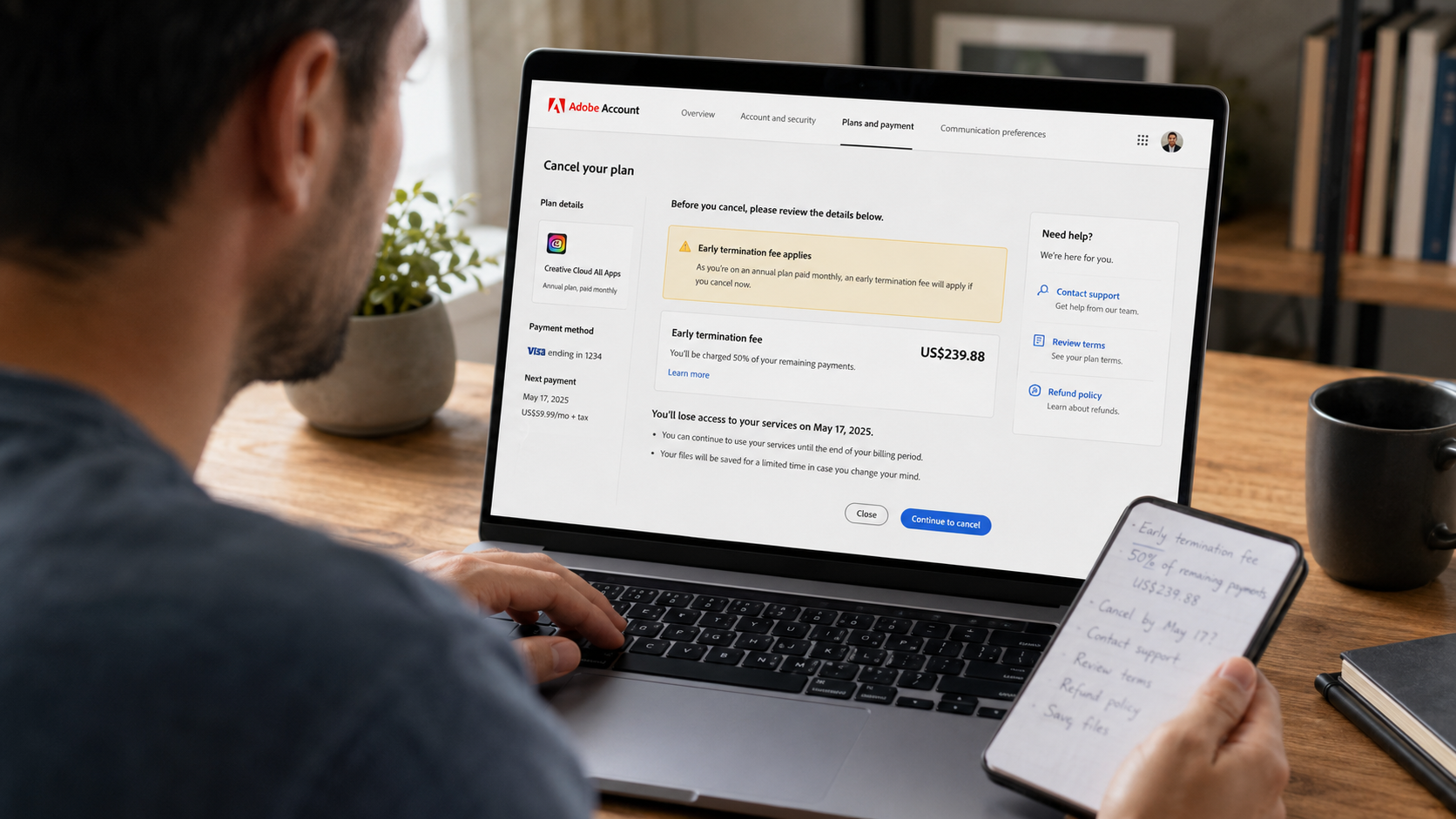
Adobe Charged a Cancellation Fee? Cancel and Ask for a Refund
Seeing an Adobe cancellation fee can feel like being charged for trying to stop being charged.
You open your account expecting a simple cancel button. Instead, Adobe shows an amount that can be far higher than one monthly payment. At that point, many people feel trapped, angry, or embarrassed because they thought they had a normal monthly subscription.
Do not panic, and do not immediately confirm the cancellation without reading the details.
The words “paid monthly” do not always mean “month-to-month.” Adobe offers annual plans that are billed in monthly instalments. That distinction is the main reason people encounter an early termination fee.
This guide explains how to identify your plan, calculate what Adobe is asking for, cancel correctly, preserve your evidence, and request a waiver or refund without making false claims.
It also explains what the major Adobe subscription developments announced in 2026 do—and do not—mean for customers.
Important: Adobe’s terms differ by country, plan, purchase date, and billing provider. Always check the cancellation screen and the terms connected to your own account before making a decision. This guide provides practical consumer information and is not legal advice.
Fast answer
You can cancel an Adobe subscription, but the financial result depends on the plan you purchased.
For most plans bought directly from Adobe, Adobe states that a full refund is available when you cancel within fourteen days of the initial purchase. After that period, the result normally depends on the plan:
- Annual plan, billed monthly: A cancellation fee equal to fifty percent of the remaining contractual balance may apply.
- Annual prepaid plan: The payment is generally non-refundable after fourteen days, but access continues until the contracted term ends.
- Monthly plan with no annual commitment: The current payment is generally non-refundable after fourteen days, but there is normally no annual early termination balance. Access continues until the end of the monthly billing period.
Subscriptions purchased through Apple, Google, Microsoft, a mobile app store, or another reseller follow that provider’s cancellation and refund process rather than Adobe’s direct process.
Adobe’s published terms and regional rules can differ, so check the terms displayed in your Adobe account before confirming anything. Adobe’s current cancellation information is available through its official subscription terms and cancellation guide.
Why is Adobe charging a cancellation fee?
The most common explanation is that the customer selected an annual plan billed monthly.
This is a one-year commitment divided into monthly payments. It is not the same product as a month-to-month subscription that can be stopped at the end of any monthly billing period without an annual contract balance.
Adobe explains that annual plans are offered at a discount compared with month-to-month pricing. Under Adobe’s published terms, ending an annual plan billed monthly more than fourteen days after the initial purchase can result in an early termination fee equal to fifty percent of the remaining contract balance.
My opinion is simple: “annual plan, paid monthly” is a combination of words that deserves very careful attention.
Many people naturally focus on the monthly price. The yearly commitment is the part that controls the cancellation fee. Before subscribing to any service, the commitment length matters just as much as the amount collected each month.
First, identify exactly what you purchased
Do this before contacting support or pressing the final cancellation button.
Step one: Open your Adobe account
Sign in to the Adobe account you normally use and open the plans section.
Look for:
- The product name
- The plan type
- The billing frequency
- The next billing date
- The renewal date
- The payment method
- Any displayed cancellation amount
Do not assume the account connected to your usual email address is the only Adobe account you have.
Adobe states that customers can have multiple accounts under different email addresses. Separate products can also create separate subscriptions. Cancelling Acrobat does not automatically cancel Adobe Stock, Creative Cloud, an artificial intelligence add-on, or another independently billed plan.
Step two: Find the original order email
Search your inbox for terms such as:
- Adobe order
- Adobe subscription
- Adobe invoice
- Adobe trial
- Adobe renewal
- Welcome to Adobe
- Your Adobe membership
The original order confirmation can show whether you agreed to:
- An annual plan billed monthly
- An annual prepaid plan
- A monthly plan
- A free trial that converted into a paid plan
- A purchase through another billing provider
Save the message as a PDF or take clear screenshots.
Step three: Check your Adobe billing history
Download the relevant invoice and record:
- The first purchase date
- The latest charge date
- The subscription name
- The account email
- The amount
- The invoice number
- The payment method
This matters because the fourteen-day refund window is generally connected to the initial purchase, not every monthly instalment.
A monthly charge on an annual contract does not automatically create a new fourteen-day refund window every month.
Step four: Confirm who actually billed you
The payment route determines where you must cancel.
Look at the statement descriptor and the original receipt.
You could have paid through:
- Adobe directly
- Apple App Store
- Google Play
- Microsoft
- Samsung Galaxy Store
- An authorized reseller
- A mobile carrier or another third party
Adobe says subscriptions purchased through third-party providers must be managed through the provider’s own cancellation process. Apple also controls cancellations and refund decisions for Adobe subscriptions purchased through an Apple account. Google Play purchases must be managed through Google Play.
Understand the three common Adobe plan types
Annual plan, billed monthly
This is the plan most closely associated with the early termination fee.
You agree to a yearly commitment, but Adobe collects the price in monthly instalments.
After the initial refund period, Adobe’s published terms state that a fee equal to fifty percent of the remaining contractual balance may apply if you cancel early.
The basic formula is:
Remaining monthly contract balance × fifty percent = potential early termination fee
Use the remaining balance shown in your account. Do not rely on a price from an old article or another customer because Adobe prices differ by product, promotion, region, tax treatment, and account.
Annual prepaid plan
This plan is paid for in advance.
Adobe states that, after fourteen days, the payment is normally non-refundable and access continues until the contracted term ends.
In this situation, cancelling generally stops the next renewal. It does not necessarily return the unused portion of the existing annual payment.
Month-to-month plan
A true monthly plan has no annual commitment.
After fourteen days, Adobe states that the current payment is normally non-refundable and access continues until the end of that monthly billing period.
The essential difference is that there is no remaining yearly contract balance to calculate in the same way as an annual plan billed monthly.
Before cancelling, save this evidence
Cancellation disputes become much harder when the customer has no screenshots, no dates, and no confirmation message.
Create a small evidence folder before changing the account.
Save:
- The plan page showing the exact plan type
- The original order confirmation
- The free-trial confirmation, when applicable
- The latest invoice
- The billing history
- The cancellation screen
- The amount of any early termination fee
- The next renewal date
- Every support chat transcript
- Every support case number
- The final cancellation confirmation
- Relevant bank or card statement entries
Include the date and time in your screenshots where possible.
Do not crop away the account email, product name, plan type, or transaction date. Those details are what connect your evidence to the subscription.
How to cancel an Adobe subscription purchased directly from Adobe
Adobe’s current process contains the following steps.
Step one: Sign in
Open your Adobe account and sign in using the email connected to the subscription.
Step two: Select “Manage plan”
Find the plan you want to stop and select Manage plan.
Check the product name carefully. Customers with multiple Adobe products must cancel each active plan separately.
Step three: Select “Cancel your plan”
Open the cancellation option.
If Adobe is processing a payment or there is a payment problem, the cancellation option may temporarily be unavailable. Adobe currently instructs customers in that situation to wait twenty-four hours and try again.
Step four: Review the cancellation details
Adobe should show information about:
- The date access will end
- Any refund
- Any early termination fee
- Benefits you will lose
- What happens to your storage
- Any remaining contractual obligation
Take screenshots before continuing.
Step five: Choose a cancellation reason
Select the truthful reason that best describes your situation.
Do not invent a fraudulent or unauthorized transaction if you originally agreed to the purchase. A misunderstanding about the plan is different from card theft or an account takeover.
Step six: Continue through the offers
Adobe can present retention offers or alternative plans during cancellation.
Read each screen carefully. Do not accept a discounted plan, plan change, pause, or replacement subscription unless you genuinely want it and understand the new commitment.
A plan change can start a new subscription, change the billing date, and create a new annual renewal date. Adobe states that when a customer changes plans, the existing plan is cancelled, the replacement plan begins immediately, and the new annual renewal date is based on the switch date.
Step seven: Confirm cancellation
Select the final confirmation button only after checking the displayed result.
Step eight: Verify that cancellation completed
Adobe instructs customers to check for a confirmation email or verify the cancellation status on the account page.
Do not treat a support conversation or a partially completed cancellation screen as proof that the subscription ended.
The strongest proof is:
- A confirmation email
- An inactive or cancelled status in the account
- A stated end date
- A case number or chat transcript confirming the result
Adobe warns that if no confirmation email was received, the cancellation may not have completed.
How to request that Adobe waive the cancellation fee
Adobe’s normal contract terms determine the standard charge. A customer can still ask support to review the situation, but a waiver is not guaranteed.
The strongest request is calm, specific, honest, and supported by evidence.
Contact Adobe support and explain:
- Which plan you purchased
- When you purchased it
- When you first noticed the yearly commitment
- Why you believed it was month-to-month, when that is genuinely what happened
- Whether you used the service after discovering the issue
- The fee shown in your account
- The exact outcome you are requesting
Ask support to:
- Cancel the subscription
- Review the early termination fee
- Waive or reduce the fee
- Refund a recent charge when applicable
- Confirm the decision in writing
Message to send Adobe support
Hello, I am requesting a review of the cancellation charge connected to my Adobe subscription.My account email is [YOUR EMAIL], and the plan is [PLAN NAME]. The subscription began on [PURCHASE DATE].I understood that I was selecting a service paid monthly and did not understand that it included an annual commitment. When I tried to cancel, my account displayed an early termination charge of [EXACT AMOUNT].I am asking Adobe to cancel the plan and review whether this fee can be waived or reduced. I am also requesting a refund of [CHARGE AND DATE], if it qualifies under the applicable refund policy.I have saved the order confirmation, invoices, cancellation screen, and account details. Please confirm the final cancellation date, any fee, any refund, and the support case number in writing.Thank you for reviewing my request.
This message does not accuse the support agent, exaggerate the facts, or threaten a bank dispute before Adobe has reviewed the problem.
It gives the agent a clear request they can escalate.
When your refund request is strongest
No situation guarantees approval outside the published terms. However, your request is more clearly supported when one of the following is true.
You are within the initial fourteen-day period
Adobe states that most plans purchased directly from Adobe qualify for a full refund when cancelled within fourteen days of the initial purchase.
Act immediately. Do not wait for the final day.
You received a charge after documented cancellation
If you have a cancellation confirmation dated before a later renewal charge, send Adobe:
- The cancellation email
- The cancellation date
- The later transaction
- The invoice
- The support case number
Ask Adobe to identify exactly why the charge occurred.
Adobe states that a charge after cancellation can result from billing-cycle timing, another active plan, or an incomplete cancellation.
You were billed for a separate Adobe plan
Review all active plans.
Adobe subscriptions can be billed independently. You may have cancelled Creative Cloud while Adobe Stock, Acrobat, or another product remained active.
Request cancellation and a review of the separate subscription rather than claiming the original cancellation covered every Adobe product.
The free trial converted into a paid subscription
Check:
- The trial start date
- The trial end date
- The paid subscription start date
- The cancellation date
- Whether the plan became annual
- Any reminder emails
A free trial can convert automatically when it ends unless it is cancelled in time. Adobe’s current cancellation information says most direct plans receive a full refund when cancelled within fourteen days of the initial purchase, but the exact result depends on the plan and region.
The charge is not connected to an account you recognize
Do not guess.
Adobe has an official Charge Finder that can identify a transaction using the details shown on the card or bank statement. Adobe notes that a recent charge can take up to forty-eight hours to appear in its system.
If the transaction belongs to another household member, another email address, or a forgotten account, handle the correct account before reporting the charge as unauthorized.
What not to do
Do not use the “change plans and cancel again” trick
Online posts sometimes recommend changing to another Adobe plan and then cancelling the new plan during a new refund period.
This is not a safe cancellation method.
Changing plans starts a replacement subscription immediately and can establish a new billing and renewal date. You could create another commitment, another payment, or a more complicated refund dispute.
Use Adobe’s official cancellation and support process instead.
Do not delete your Adobe account first
Cancel the paid plan and save your evidence before attempting to close the account.
Deleting or closing access too early can make it harder to retrieve:
- Invoices
- Plan details
- Cloud files
- Support history
- Cancellation proof
Do not only uninstall the application
Deleting Photoshop, Acrobat, Lightroom, or the Creative Cloud desktop application does not cancel billing.
A subscription is controlled through the billing account or original app store.
Do not replace the card and assume the contract disappeared
Blocking a payment method is not the same as cancelling a subscription agreement.
It can also leave the plan active or create failed-payment issues. Cancel through the correct provider and get written confirmation.
Do not call an authorized charge “fraud”
Use the term unauthorized only when you genuinely did not approve the purchase and no authorized person used your payment method.
A plan that was confusing, expensive, or forgotten is not automatically card fraud.
Do not wait without documenting the problem
Refund windows and bank-dispute deadlines can depend on dates.
Save the proof and contact the correct company promptly.
What happens to your Adobe apps and files after cancellation?
Adobe says access to paid applications and services generally continues until the end of the current billing period.
After the paid subscription ends:
- The Adobe account remains active
- The account changes to a free membership
- Access to most paid Creative Cloud applications ends
- Local files saved on the computer remain accessible
- Cloud storage is reduced to five gigabytes
- Customers above the free storage limit receive thirty days to reduce their online usage
- Some or all cloud-hosted files can become inaccessible if the storage is not reduced
- Remaining generative credits included with the paid subscription expire
Adobe also states that Lightroom original images are retained for one year after a membership lapses, allowing customers to download originals during that period. The rules for Lightroom Classic files stored locally are different from cloud-hosted files.
Before cancelling, protect your work
Do the following:
- Check your Creative Cloud storage usage.
- Download essential cloud documents.
- Export Lightroom originals.
- Save local copies of active projects.
- Confirm that linked assets and fonts will still work.
- Export invoices and account records.
- Check whether collaborators need copies of shared files.
- Verify that your saved files can open without the paid application.
Do not wait until after access ends to discover that an important project only existed in cloud storage.
How long does an Adobe refund take?
Adobe’s current billing guidance states that refunds normally take between three and ten business days to process and return to the original payment method.
The date you see the money depends on the payment provider and account.
Save:
- The refund approval
- The amount
- The processing date
- The original transaction
- The last four digits of the payment method
- The support case number
When the expected period has passed, contact Adobe with the approval reference before opening a bank dispute.
What if Adobe refuses the refund?
A refusal does not always mean the response was reviewed at the highest available level.
Ask the support agent for:
- The exact policy used
- The plan type
- The purchase date Adobe has on file
- The calculated cancellation fee
- The reason the refund was denied
- A support case number
- Written confirmation
- Escalation to a billing supervisor when the facts were misunderstood
Keep the request factual.
A useful appeal can say:
Thank you for the response. I am requesting a second review because the decision does not address [SPECIFIC ISSUE]. My evidence shows [DATE OR DOCUMENT]. Please escalate the case and provide the plan term, transaction date, and policy section used to calculate the cancellation fee or deny the refund.
Do not send ten emotional messages with different explanations. One clear timeline is more useful than repeated anger.
When to contact your bank or card provider
Contact the merchant first when the issue is a refund request, confusing plan, cancellation fee, or billing mistake that Adobe can correct.
Consider contacting your card provider when:
- The charge is genuinely unauthorized
- Adobe continues billing after documented cancellation
- Adobe approved a refund but the funds never arrived
- The charged amount does not match the invoice or agreement
- The merchant has stopped responding
- The card provider’s dispute deadline is approaching
The United States Federal Trade Commission advises customers to save cancellation records and dispute later charges when a company continues billing after a cancellation attempt.
For United States credit cards, the Consumer Financial Protection Bureau says customers should notify the card company promptly. Its guidance also describes a written billing-error notice sent within sixty calendar days after the charge appeared on the statement to preserve federal billing-error protections. Rules outside the United States differ, so ask your bank for the exact local process and deadline.
A bank dispute is not a guaranteed refund. Give the bank accurate evidence and classify the dispute honestly.
Adobe’s 2026 United States settlement: what it means
On March 13, 2026, the United States Department of Justice announced that it had filed a proposed stipulated order to resolve allegations concerning Adobe’s online subscription practices.
The proposed order called for:
- Seventy-five million dollars in civil penalties
- Seventy-five million dollars in free services
- Clearer disclosure of early termination fees
- Clear explanation of how those fees are calculated
- Reminders before certain free trials convert into paid subscriptions with an early termination fee
- Easier cancellation methods
The government alleged that important plan and early termination information had not been displayed clearly enough and that subscribers encountered unnecessary obstacles when trying to cancel.
These are government allegations connected to a proposed resolution. The announcement does not mean every Adobe customer automatically receives a cash refund. The Department of Justice described free services and civil penalties, not a universal cash-refund program for everyone who previously paid Adobe.
Do not give personal information to a website claiming it can collect an automatic Adobe settlement payment unless that process is confirmed through an official government or court source.
The United Kingdom Adobe investigation
On March 19, 2026, the United Kingdom Competition and Markets Authority opened an investigation concerning early termination fee terms for certain Adobe products.
The authority is examining:
- Whether the term is unfair in a consumer contract
- Whether information about the term was presented in a way that involved a misleading omission
As of August 1, 2026, the official case page lists the investigation as open. Its initial evidence-gathering period runs from March through September 2026, with another case update expected in autumn 2026.
The authority expressly states that no infringement finding has been made at this stage.
That distinction matters. An investigation is not a final judgment, and it does not automatically cancel a customer’s existing contractual charge.
What about customers in the European Union?
European Union consumer guidance provides a fourteen-day cooling-off period for many services purchased online, beginning after the service contract is agreed.
Exceptions can apply, particularly when digital content or a service begins immediately after the customer expressly agrees to performance and acknowledges the relevant effect on withdrawal rights.
Customers should check the law and Adobe terms applicable to the country of purchase rather than assuming one rule applies identically across Europe. The European Consumer Centre in the customer’s country can assist with certain cross-border consumer disputes.
Proof checklist
Before considering the matter finished, confirm that you have saved:
- Original order confirmation
- Trial start and end dates
- Exact plan type
- Renewal date
- Billing history
- Relevant invoices
- Cancellation fee screenshot
- Support transcript
- Support case number
- Cancellation confirmation email
- Account page showing the plan is inactive
- Refund approval
- Bank statement showing the refund
- Copies of important Creative Cloud files
Common mistakes
Mistake one: Confusing “paid monthly” with “monthly plan”
The billing frequency and commitment length are separate facts.
Mistake two: Cancelling only one Adobe product
Each independently billed plan must be reviewed.
Mistake three: Cancelling through Adobe when Apple or Google billed the purchase
Use the original billing provider.
Mistake four: Leaving without a confirmation email
A cancellation attempt is not the same as a completed cancellation.
Mistake five: Ignoring cloud files
Paid storage can fall to five gigabytes after cancellation.
Mistake six: Waiting for support without saving the deadline
Contact the company promptly and ask the card provider about its dispute deadline.
Mistake seven: Claiming fraud when the real problem is a misunderstood contract
Describe the problem accurately. A clear, honest request is easier to evaluate.
Mistake eight: Accepting a replacement plan without reading it
A discount or plan change can start a new commitment.
Frequently asked questions
Why is Adobe asking me to pay a cancellation fee?
You likely have an annual plan billed in monthly instalments. Adobe’s published terms state that cancelling this type of plan after fourteen days can result in a fee equal to fifty percent of the remaining contractual balance.
Check your account because your exact plan, country, and purchase route control the result.
Can I cancel Adobe without paying the fee?
You can cancel, but whether a fee applies depends on the plan and timing.
A customer within the applicable full-refund period can qualify for a refund under Adobe’s published policy. A true month-to-month plan does not carry the same annual remaining-balance calculation. Adobe can also choose to waive a fee after reviewing a support request, but a discretionary waiver is not guaranteed.
Can Adobe waive the early termination fee?
You can ask Adobe support to review and waive or reduce it.
Provide the purchase date, plan type, fee amount, reason for the request, and supporting evidence. Adobe’s public policy does not promise that every waiver request will be approved.
Does deleting Creative Cloud cancel my subscription?
No. Uninstalling an application does not cancel the billing agreement.
Cancel through your Adobe account or the third-party store that processed the purchase.
Does deleting my Adobe account cancel billing?
Do not rely on account deletion as a cancellation method.
Cancel the subscription first, save confirmation, protect your files, and then consider closing the account.
I cancelled Adobe. Why was I charged again?
Adobe lists three common reasons:
- The charge was the final payment for the current billing period
- Another Adobe plan remains active
- The cancellation did not complete
Check your confirmation email, every active plan, and the invoice connected to the charge.
Can I get an Adobe refund after a free trial?
Adobe states that most plans purchased directly from Adobe receive a full refund when cancelled within fourteen days of the initial purchase.
App-store purchases follow the store’s rules. Check the exact paid-plan start date and cancel immediately.
Is an annual plan billed monthly the same as a monthly plan?
No.
An annual plan billed monthly is a one-year commitment divided into monthly payments. A monthly plan has no annual commitment.
Will I lose my files after cancelling Adobe?
Files saved locally remain on the device.
Adobe states that free cloud storage is limited to five gigabytes after cancellation. Customers above that amount receive thirty days to reduce their online usage, after which access to some cloud files can be affected.
Download important work before the paid plan ends.
How do I know the cancellation succeeded?
Look for a cancellation confirmation email and verify the status in your Adobe account.
Save both.
How long does an Adobe refund take?
Adobe states that refunds usually take three to ten business days to return to the original payment method.
Should I dispute the charge with my bank?
Contact Adobe first when the issue can be corrected through billing support.
Contact the bank promptly when the transaction is genuinely unauthorized, Adobe continues charging after documented cancellation, an approved refund does not arrive, or the bank’s dispute deadline is approaching.
Does the 2026 Adobe settlement give me a cash payment?
The Department of Justice announcement described a proposed order involving civil penalties and free services. It did not announce an automatic cash payment for every Adobe customer.
Use only official government or court announcements for future eligibility information.
Has the United Kingdom ruled that Adobe’s cancellation fee is illegal?
No final finding has been announced.
The Competition and Markets Authority opened an investigation in March 2026 and states that no infringement finding has been made at the current stage.
Final advice
A cancellation fee becomes less frightening when you break the problem into facts:
- What plan did you buy?
- Who billed you?
- When did the paid subscription begin?
- Are you inside a refund window?
- What amount is Adobe calculating?
- Did the cancellation complete?
- What proof do you have?
My strongest advice is to slow down before clicking the final button.
Take the screenshots. Download the invoice. Protect your files. Read the exact plan name. Then cancel through the correct provider and ask for the precise result you want.
You do not need to insult a support agent, invent a story, or follow an unofficial loophole.
You need a clear timeline, honest evidence, and written confirmation.
Last reviewed: August 1, 2026. Adobe policies, prices, investigations, and regional consumer rules can change. Check the official sources below before acting.