
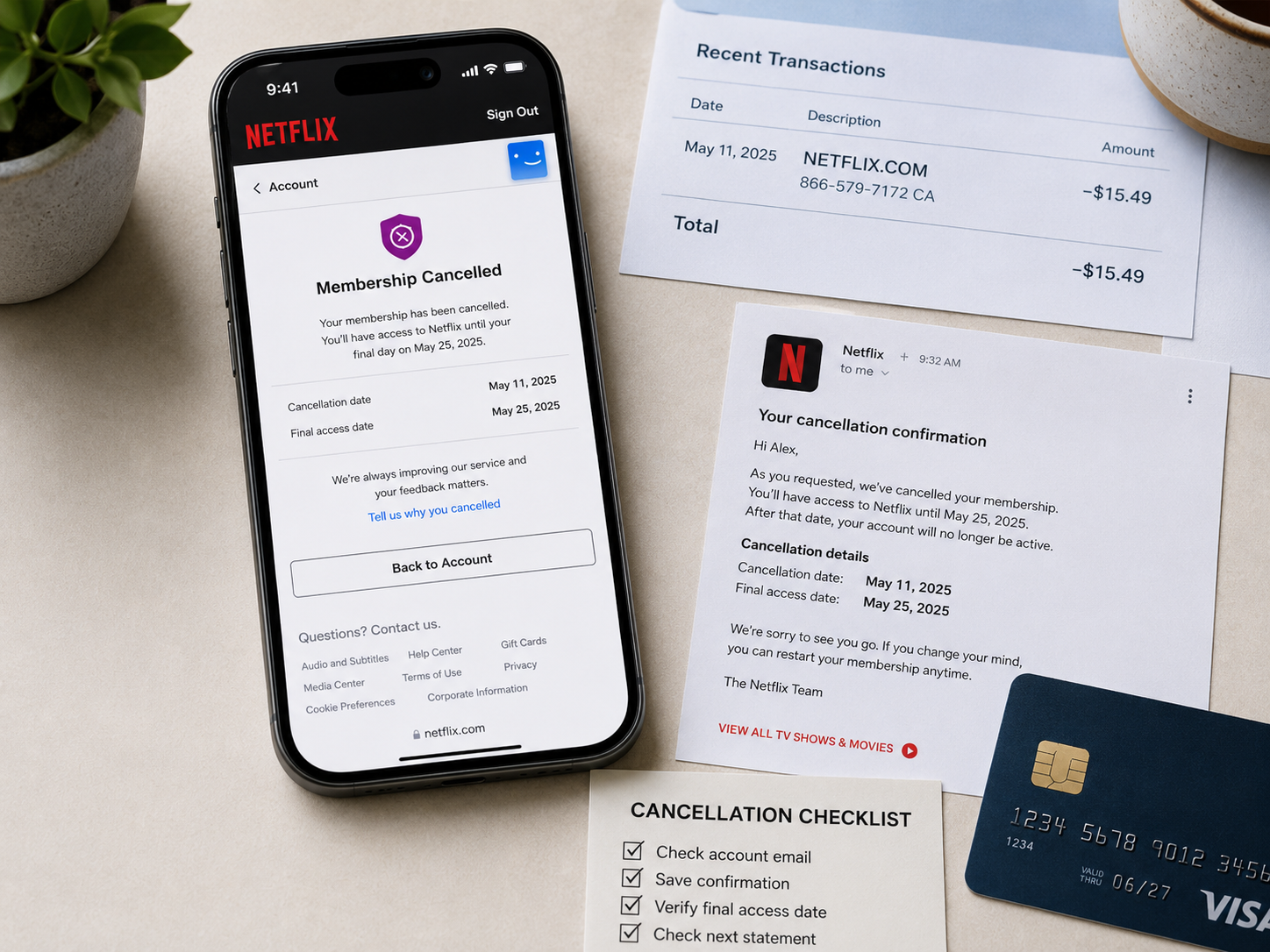
Cancelling Netflix looks simple. You open your account, select the cancellation option and confirm that you want the membership to end.
The difficult part is not usually finding the button.
The difficult part is confirming that you cancelled the correct account, through the correct billing provider, and that the membership was not restarted afterward.
When I check a subscription cancellation, I never rely only on memory. I look for three things:
- The account that is actually being billed.
- The confirmation showing that cancellation was completed.
- The final date on which access will end.
That short check prevents most of the confusion covered in this guide.
You may have deleted the Netflix app, signed out of every device or stopped watching months ago. None of those actions alone proves that billing ended.
This guide explains the most common Netflix cancellation mistakes, how to confirm that your membership is really ending and what to save in case another charge appears.
The fast answer
To cancel a Netflix membership billed directly by Netflix:
- Sign in to the Netflix account that is being charged.
- Open the account or cancellation page.
- Select Finish Cancellation.
- Confirm the final day of access.
- Save the confirmation screen and cancellation email.
- Check your next bank statement after the expected billing date.
Netflix says that an account normally closes at the end of the current billing cycle after cancellation. You can generally continue watching until that date, but you should not be charged for another billing cycle.
When Netflix is included through a phone provider, television package or another billing partner, you may need to manage the payment through that provider instead.
Why a simple Netflix cancellation can become confusing
Netflix accounts can involve several separate details:
- An account email.
- Multiple viewing profiles.
- A household with several users.
- More than one saved payment method.
- A television or mobile provider.
- A package that includes Netflix.
- An older account that someone forgot about.
- Devices where the account remains signed in.
A person can honestly believe Netflix was cancelled while the billed account remains active.
For example, someone may cancel an old account connected to one email address while a second account continues charging the same household card.
Another person may delete the app and assume that this ends the subscription.
Someone else may complete the Netflix cancellation correctly, but another person with access to the account later restarts the membership.
The result is the same: another Netflix charge appears, and nobody immediately understands why.
Mistake one: deleting the Netflix app
Deleting the Netflix app does not cancel the membership.
The app is only one way to access Netflix. Removing it from a phone, tablet, television or streaming device does not automatically change the billing status of the account.
The same applies when you:
- Sign out of the app.
- Remove Netflix from a smart television.
- Stop using the service.
- Delete downloaded programmes.
- Replace your phone.
- Disconnect a streaming device.
To end a membership billed directly by Netflix, complete the official cancellation process through the account.
What to do instead
Sign in through a browser and open the Netflix account page.
Look for the membership or cancellation section and follow the cancellation process until Netflix confirms that it is finished.
Do not stop after opening the cancellation page. Netflix’s instructions include selecting Finish Cancellation to complete the process.
Save the final confirmation screen.
Mistake two: cancelling the wrong Netflix account
A Netflix profile is not the same as a Netflix account.
One account can contain several profiles, but all of those profiles belong to the same membership. Deleting an individual profile does not cancel the paid account.
The opposite problem can also happen. A household may have more than one Netflix account, each connected to a different email address.
You may cancel one account while another continues billing the same card.
How to identify the billed account
Start with the Netflix receipt rather than guessing.
Search every email account you use for:
- Netflix
- Your Netflix receipt
- Netflix payment
- Netflix billing
- Membership
- The exact amount charged
Open the most recent legitimate receipt and check the email address associated with the account.
Then compare it with the account currently open on your device.
Check the payment history
Netflix provides payment and billing information through the account area.
Compare:
- The payment date.
- The amount.
- The plan.
- The payment method.
- The charge shown by your bank.
When the amount and date match, you have found the account responsible for the payment.
Do not confuse profiles with accounts
Profile names can include personal names such as “John,” “Family” or “Kids.”
Those names do not identify the account owner or the billing email.
Always check the account information and receipt.
Mistake three: stopping before the cancellation is complete
Opening the cancellation page is not the same as finishing the cancellation.
A user may select the first cancellation option, see another offer or pause option, and close the page before the final confirmation.
Netflix may offer alternatives such as changing the plan or pausing the membership. Those options are not the same as permanently cancelling it.
A paused membership can resume later and billing can restart according to the conditions displayed on the account.
How to confirm completion
After cancelling, look for clear wording showing:
- The membership is cancelled.
- The account will close on a specific date.
- You will not be billed for another cycle.
- Access remains available only until the end of the current paid period.
Save a screenshot that includes the status and date.
Also check for a confirmation email from Netflix.
When you cannot find either a completed cancellation screen or an email, return to the account and verify the status.
Mistake four: assuming immediate access loss proves cancellation
A normal Netflix cancellation does not always stop access immediately.
When you have already paid for the current billing period, Netflix generally allows you to continue watching until that period ends.
This means your account can still work after cancellation.
That does not automatically mean the cancellation failed.
The important detail is the final access date shown by Netflix.
Example
Suppose your normal billing date is the twenty-fifth of each month and you cancel on the tenth.
Netflix may allow you to continue watching until the twenty-fifth because that period was already paid.
The cancellation should prevent the next regular renewal after the current paid period ends.
Check the date shown on the cancellation confirmation rather than testing whether videos still play.
Mistake five: forgetting about partner billing
Not every Netflix membership is paid directly to Netflix.
Some memberships are connected to:
- A television provider.
- A broadband package.
- A mobile-phone provider.
- A telecommunications bundle.
- A third-party payment arrangement.
- A package that includes Netflix.
In those cases, the provider can control part or all of the billing relationship.
Netflix may direct you to manage the membership through that provider.
How to identify partner billing
Check the Netflix account page and your statement.
Look for:
- The provider’s name.
- Wording that the membership is included in a package.
- Instructions to manage billing through another company.
- A charge from the provider instead of Netflix.
- A provider bill that lists Netflix as part of a bundle.
Your Netflix billing date and the provider’s billing date may not be identical.
What to save
When partner billing is involved, save:
- The Netflix account status.
- The provider cancellation confirmation.
- The package or service name.
- The date the provider says Netflix access will end.
- The provider bill showing the Netflix charge.
- Any reference or support number.
If both Netflix and the provider show separate actions, document both.
Mistake six: believing a new package automatically replaces old billing
A person may activate Netflix through a new television, mobile or internet package and assume the old direct subscription will automatically disappear.
That does not always happen.
The new package may need to be linked correctly to the existing Netflix account. An older billing route may remain active when the linking process is incomplete.
In some partner arrangements, customers previously billed through another platform must separately cancel the old billing method.
Check for overlapping billing
Look for:
- A direct Netflix charge.
- A provider package fee.
- An Apple or app-store charge from an older arrangement.
- Two Netflix accounts using different emails.
- A separate extra-member charge.
Do not cancel random accounts until you identify which membership contains the viewing history and profiles you want to keep.
First map the accounts and payments. Then cancel the unwanted billing route.
Mistake seven: not checking whether someone restarted the membership
Netflix allows cancelled memberships to be restarted.
If another person still has access to the account, that person may restart it without understanding that billing will resume.
Netflix specifically advises people who were charged after cancelling to change their password and sign out of all devices to prevent another person from restarting the account.
Secure the account after cancellation
When other people have used the account:
- Change the Netflix password.
- Use a unique password that is not shared with another service.
- Select the option to sign out of all devices.
- Review recent account access.
- Remove unfamiliar devices.
- Confirm the membership status again.
Do this especially when:
- You shared the password with a former partner.
- The account was used in a holiday rental or hotel.
- Several relatives know the password.
- An old television is still signed in.
- You see unfamiliar viewing activity.
- The account was restarted without your permission.
Changing the password after cancellation is not an overreaction when account access is widely shared. It protects the cancellation from being reversed by someone else.
Mistake eight: forgetting extra-member charges
Netflix offers extra-member arrangements in supported plans and countries.
An extra member can have a separate account and password while the main account owner pays for the extra-member slot.
This can create confusion because cancelling or removing one part of the arrangement does not always mean the entire main membership has ended.
Check whether the amount on the statement represents:
- The main Netflix plan.
- An extra-member slot.
- A plan change.
- More than one Netflix account.
- A package or partner payment.
Review the account’s membership and billing information before deciding that the same charge was duplicated.
Mistake nine: cancelling after a new billing cycle started
Netflix members are normally billed monthly according to their billing date.
When you cancel after a new billing period has started, the cancellation usually applies at the end of that paid period.
It does not automatically reverse the charge for the current cycle.
This is why the cancellation date and billing date must be compared.
Write down the complete timeline
Record:
- The normal billing date.
- The date the latest charge appeared.
- The date the transaction completed.
- The date you cancelled.
- The final access date.
- Any date displayed in the confirmation email.
A clear timeline can show whether the payment occurred before or after the completed cancellation.
Mistake ten: keeping no cancellation proof
A cancellation without saved proof becomes difficult to explain later.
People often remember the general event but not:
- Which account they used.
- What time they cancelled.
- Whether they selected the final confirmation button.
- What end date Netflix displayed.
- Whether they chose cancellation or a temporary pause.
A single screenshot can answer several of those questions.
What to save immediately
Save:
- The cancellation confirmation screen.
- The account email.
- The cancellation date and time.
- The final access date.
- The cancellation email.
- The current membership status.
- The payment history.
- Any partner-billing confirmation.
- Your next statement after the billing date.
Keep the files until at least one expected renewal date passes without another charge.
My cancellation-proof routine
When I check any subscription cancellation, I use a small proof folder.
I do not depend on remembering that I clicked a button.
For Netflix, I would save the evidence in this order:
- A screenshot of the account email.
- A screenshot of the active plan and billing date.
- The completed cancellation screen.
- The cancellation email.
- The final date of access.
- A screenshot of the membership status after cancellation.
- The next bank statement showing whether another payment occurred.
I name the files clearly:
- 01-netflix-account-email
- 02-netflix-billing-date
- 03-netflix-cancellation-confirmed
- 04-netflix-confirmation-email
- 05-netflix-final-access-date
- 06-netflix-next-statement
This may look excessive for a streaming subscription, but it takes only a few minutes and creates a reliable timeline.
How to check whether Netflix is really cancelled
Use this checklist after completing the cancellation.
Account status
The account should show that the membership is cancelled or will end on a stated date.
Final access date
Netflix should display when viewing access will stop.
No new renewal
The account should not show another normal renewal after the cancellation takes effect.
Confirmation email
Search for an email confirming the cancellation.
Correct account
Verify that the email address shown is connected to the charge on your statement.
Partner status
When you pay through another provider, verify the status through the provider’s account too.
Account security
Change the password and sign out of all devices when another person could restart the membership.
What to do when Netflix charges you after cancellation
Do not begin by submitting a bank dispute.
First identify why the payment happened.
Step one: confirm the charge
Check whether the bank transaction is:
- Pending.
- Completed.
- A temporary authorisation.
- A second charge.
- Part of a provider bill.
Record the amount, date and merchant description.
Step two: sign in to the billed Netflix account
Use the email connected to the Netflix receipt.
Open the account and inspect:
- Membership status.
- Billing date.
- Payment history.
- Plan.
- Extra-member charges.
- Billing provider.
Step three: compare the dates
Compare the payment date with:
- The cancellation date.
- The final access date.
- The normal monthly billing date.
A charge from before the completed cancellation is different from a charge processed after the account should have closed.
Step four: check whether the membership was restarted
If Netflix shows an active membership after you previously cancelled, review whether someone with account access restarted it.
Change the password and sign out of all devices.
Step five: contact Netflix or the billing partner
Contact the company that processed the payment.
When the statement shows Netflix and the account was billed directly, contact Netflix.
When the charge is part of a mobile, television or broadband package, contact that provider.
Present a short timeline and attach the relevant proof.
Message to send Netflix support
Use a factual message rather than a long complaint.
I cancelled the Netflix account connected to [account email] on [date]. The cancellation confirmation showed that access would end on [date]. A charge of [amount] appeared on [date]. The account currently shows [membership status]. Please review the payment and confirm why the account was charged after the cancellation.
When the account appears to have been restarted, add:
I did not intend to restart the membership. I have now changed the password and signed out of all devices. Please confirm when the account was restarted and review the latest charge.
Do not include your full card number, banking password or unrelated transactions.
What if you cannot access the Netflix account?
Start by trying the email addresses normally used in your household.
Search those inboxes for Netflix receipts.
When you find the billed email, use Netflix’s official account-recovery process.
If you never created the account or believe someone used your payment details without permission, Netflix directs users to contact its support team about unrecognised or unauthorised charges.
Also contact your bank promptly when:
- You do not recognise the account.
- The payment method may have been stolen.
- Several unknown transactions appear.
- You believe your card details are being misused.
Do not describe a forgotten account as fraud. Explain exactly what you recognise and what you do not.
What if the Netflix charge appears on an expired card?
A card’s visible expiry does not always prove that every recurring payment relationship ended.
Banks and payment networks can sometimes update credentials connected to recurring payments.
The correct action is still to cancel the underlying Netflix membership and identify the account that created the charge.
Replacing or freezing a card should not be treated as a substitute for subscription cancellation.
What if Netflix charged you twice?
Two charges do not always mean the identical subscription was billed twice.
Netflix lists several possible explanations for multiple charges, including account changes and additional account features.
Check for:
- Two separate Netflix accounts.
- A recent plan upgrade.
- An extra-member slot.
- Direct Netflix billing and a provider package.
- A temporary payment authorisation.
- Different billing dates.
- A recent payment-method change.
Match each amount to the account’s payment history.
Contact Netflix when two completed charges cannot be explained by the account information.
When should you contact your bank?
Contact the merchant first when you recognise the Netflix account and the disagreement concerns cancellation timing.
Contact your bank promptly when:
- You never authorised the account.
- Netflix cannot find a matching account.
- Your card details may have been compromised.
- The merchant cannot resolve an incorrect completed charge.
- You need information about your formal dispute rights.
- More unauthorised transactions are appearing.
Tell the bank whether the payment is:
- A recognised subscription renewal.
- A charge after cancellation.
- A duplicate transaction.
- An unknown account.
- Suspected card fraud.
Those situations are not identical, and the bank’s procedure can differ.
What not to do
Do not delete the account before saving evidence
Keep the account available long enough to record the billing history, status and cancellation information.
Do not send full financial documents
Crop screenshots to the relevant payment. Hide your account balance, full card number and unrelated transactions.
Do not publicly post account information
Do not share your email address, payment details, receipt number or support conversation on social media.
Do not create several support cases for the same charge
Keep one clear record and add new evidence to the existing conversation where possible.
Do not cancel random accounts
Identify the billed account before making changes that could remove profiles or viewing history you intended to keep.
Do not treat pausing as permanent cancellation
A paused membership can resume. Read the date and terms shown on the pause screen.
Complete Netflix cancellation checklist
Before cancellation:
- Confirm the account email.
- Check the current plan.
- Record the billing date.
- Check whether Netflix is billed directly or through a partner.
- Review any extra-member charges.
- Save the latest payment history.
During cancellation:
- Use the official account cancellation flow.
- Select the final cancellation confirmation.
- Do not choose pause when you want to cancel permanently.
- Record the cancellation date and time.
- Save the confirmation screen.
- Note the final access date.
After cancellation:
- Save the confirmation email.
- Recheck the account status.
- Change the password when other people have access.
- Sign out of all devices when necessary.
- Verify partner cancellation separately.
- Check the next statement.
- Keep the proof until the next expected renewal date passes.
Frequently asked questions
Does deleting the Netflix app cancel the subscription?
No.
Deleting the app removes it from the device. It does not complete Netflix’s membership-cancellation process.
Does signing out cancel Netflix?
No.
Signing out only removes access from that device. The membership and billing can continue.
Can I keep watching after cancelling Netflix?
Yes, when the current billing period has already been paid, Netflix generally allows access until the end of that period.
Check the final access date displayed on your account.
How do I know Netflix is completely cancelled?
Check for a cancelled membership status, a final access date and a confirmation email.
Also verify that you cancelled the account connected to the actual charge.
Why did Netflix charge me after I cancelled?
Possible reasons include:
- The payment occurred before the cancellation was completed.
- You cancelled a different account.
- Someone restarted the membership.
- Billing is managed through a partner.
- The cancellation was not finished.
- The account was paused rather than cancelled.
- A separate extra-member or account charge exists.
Compare the account, payment and cancellation dates.
Can someone restart my Netflix account after I cancel?
A person with access to the account can potentially restart the membership.
Netflix recommends changing the password and signing out of all devices when you were charged after cancellation and another person could have restarted the account.
Is deleting a Netflix profile enough?
No.
Deleting a profile does not cancel the main membership.
What if I used the wrong email address?
Search all email inboxes for Netflix receipts and match the amount and date to your bank statement.
Then cancel the account connected to the matching receipt.
How do I cancel Netflix through a television provider?
Check your Netflix account and the provider’s account for billing instructions.
The cancellation route depends on the provider and package.
Can I cancel Netflix by cancelling my bank card?
Replacing, blocking or cancelling a card is not a reliable substitute for ending the membership.
Cancel through Netflix or the billing partner.
Why can I still watch after cancelling?
Your current billing period may remain active until the final access date.
Continued access during that paid period does not automatically mean another renewal is scheduled.
What is the difference between pausing and cancelling Netflix?
Pausing temporarily stops access and payment according to the pause terms, but the membership can automatically resume.
Cancellation ends the membership after the current paid period.
Can I get a refund from Netflix after cancelling?
Refund availability depends on the transaction and circumstances.
Contact Netflix or the provider that processed the charge and provide the cancellation evidence and payment timeline.
Do not assume that cancellation automatically refunds an earlier completed payment.
What if I never created the Netflix account?
Contact Netflix about an unrecognised or unauthorised charge and contact your bank when you believe your payment information was used without consent.
How long should I keep cancellation proof?
Keep it until at least one expected renewal date has passed and your next relevant statement confirms that no new charge occurred.
Final advice
Netflix cancellation is easy only when you know which account and billing route you are cancelling.
Do not depend on deleting the app, signing out or remembering that you pressed a button.
Confirm the account email. Complete the official cancellation flow. Save the final access date. Check for partner billing. Secure the account when other people have access. Then inspect the next bank statement.
A reliable cancellation record should answer five questions:
- Which account was billed?
- Who processed the payment?
- When was the membership cancelled?
- When was access supposed to end?
- Did another completed charge appear after that date?
When those facts are documented, Netflix, the billing provider or your bank can understand the problem without guessing.
Editorial note
This article documents the practical checks I use when reviewing a subscription cancellation. It does not claim that every post-cancellation charge is an error, and it does not guarantee a refund.
Netflix can change its account screens, plans and partner arrangements. Always verify the current instructions displayed inside your account and on Netflix’s official Help Center.
Comments (0)
No published comments yet. Start a useful, respectful discussion.